AUTOMATION CASE STUDY: BLOG TO SOCIAL

Published once, distributed automatically. 

Two connected workflows. One promotes your own published articles to LinkedIn and Facebook. The other collects marketing and AI news into a review queue, waits for your take, and only posts after approval.

The problem

Publishing is easy. Distribution is not. 

Posting consistently is usually a production problem, not an ideas problem. Someone has to notice the article went live, rewrite it short, post it twice, then go find something worth saying in the weeks between articles. Every one of those steps is small, and every one of them is the step that gets skipped.

01

Notice the post went live

02

Write a social version

03

Post to Facebook

04

Post to LinkedIn

05

Hunt for industry news

06

Decide what is worth sharing

07

Write the commentary

08

Remember what was posted

Before

Good content sat on the site while the social feed went quiet for weeks.

New question

What if the only parts left to a person were choosing the angle, adding the opinion, and approving the post?

The solution

Two workflows, one content system. 

One workflow watches the blog feed and promotes each new article to LinkedIn and Facebook. The other collects industry news into a review sheet, waits for you to pick what matters and write your take, then publishes only after approval.

Watch the Loom walkthrough
01

Make.com

Orchestrates both workflows, the filters, and the row bookkeeping.

02

RSS

Watches the blog feed so a new post starts the run on its own.

03

Gmail

Collects incoming marketing and AI news as raw source material.

04

AI assistants

Chooses relevant articles and writes the short social summaries.

05

Google Sheets

Acts as the review queue, the approval switch, and the posting log.

06

LinkedIn + Facebook

Receive the text post and page post with the summary, your take, and the link.

Scroll story: workflow 1

From published post to social channels. 

Each chapter advances the first workflow while the proof panel changes beside it: the published article, the feed watch, the short summary, and both channels receiving it.

Vertical story view

Chapter 01

A blog is published

Hybrid

The article goes live on the site.

What happens

The run starts after a blog post is published to the website, whether that article was written manually or produced through the blog writing automation.

Why it matters

Distribution should begin from something that already happens, not from a second reminder to go post about it.

Behind the scenes

Published post -> blog feed entry.

Data moving through this chapter

Post titlePost bodyPermalinkPublish date
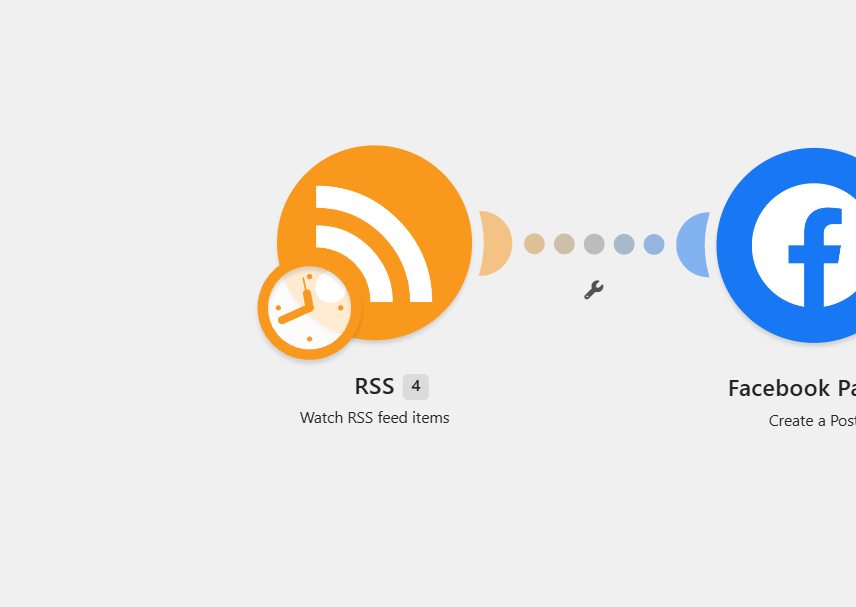
Zoomed view of the Make.com scenario showing the RSS Watch feed items module and the summary step.

Feed watch and summary

RSS watches the blog feed and the new post is condensed into a short social summary.

Chapter 02

The feed is watched

Automation

RSS picks up the new item automatically.

What happens

An RSS module watches the blog feed and picks up new items as they appear, so nothing has to be forwarded or pasted in.

Why it matters

Watching the feed removes the only step people actually forget: telling the system that something new exists.

Behind the scenes

RSS Watch feed items -> new item bundle.

Decision logic

Already-seen item? Skipped. New item? It moves into the summary step.

Data moving through this chapter

Feed itemItem linkItem summaryRun trigger
Zoomed view of the Make.com scenario showing the RSS Watch feed items module and the summary step.

Feed watch and summary

RSS watches the blog feed and the new post is condensed into a short social summary.

Chapter 03

A summary is written

Automation

The post becomes a short social version.

What happens

The published post is condensed into a short social summary rather than reposted in full.

Why it matters

A pasted article reads like a dump. A summary with a link reads like a post someone wrote on purpose.

Behind the scenes

Feed content -> summary completion -> post text.

Data moving through this chapter

Summary textLinkHook linePost body
Zoomed view of the Make.com scenario showing the RSS Watch feed items module and the summary step.

Feed watch and summary

RSS watches the blog feed and the new post is condensed into a short social summary.

Chapter 04

Facebook receives the post

Automation

The page post goes out first.

What happens

The summary and the link to the blog are published to the Facebook page.

Why it matters

The audience that follows the page sees the article the day it goes live instead of a week later.

Behind the scenes

Facebook Pages Create a Post.

Data moving through this chapter

Page postSummaryBlog linkPost ID
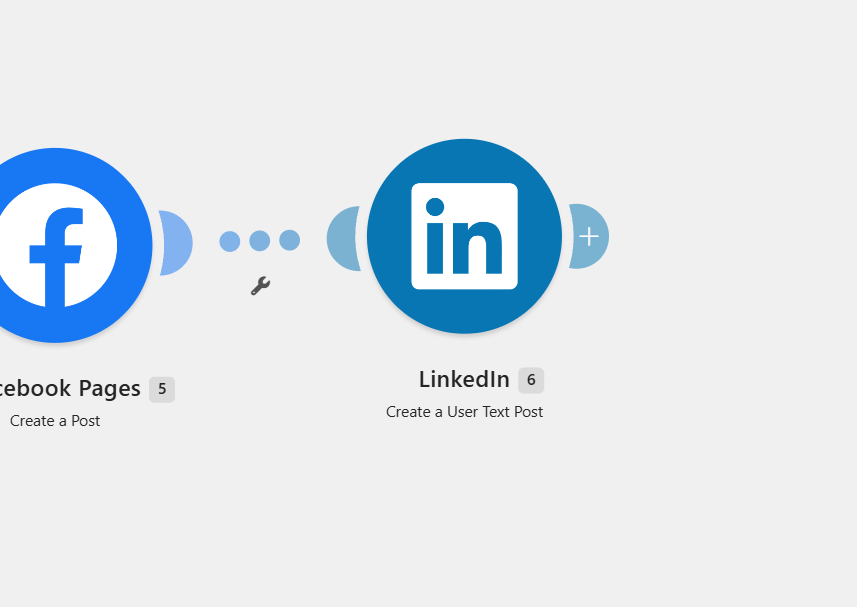
Zoomed view of the Make.com scenario showing Facebook Pages Create a Post and LinkedIn Create a User Text Post modules.

Facebook and LinkedIn

The same summary and link are published to the Facebook page and as a LinkedIn text post in one run.

Chapter 05

LinkedIn receives the post

Automation

The same run covers the second channel.

What happens

The same summary and link go out as a LinkedIn text post inside the same run.

Why it matters

Cross-posting is the part most likely to be skipped when it is manual, and the part that costs nothing when it is not.

Behind the scenes

LinkedIn Create a User Text Post.

Data moving through this chapter

Text postSummaryBlog linkRun complete
Zoomed view of the Make.com scenario showing Facebook Pages Create a Post and LinkedIn Create a User Text Post modules.

Facebook and LinkedIn

The same summary and link are published to the Facebook page and as a LinkedIn text post in one run.

05 / 05Workflow 2
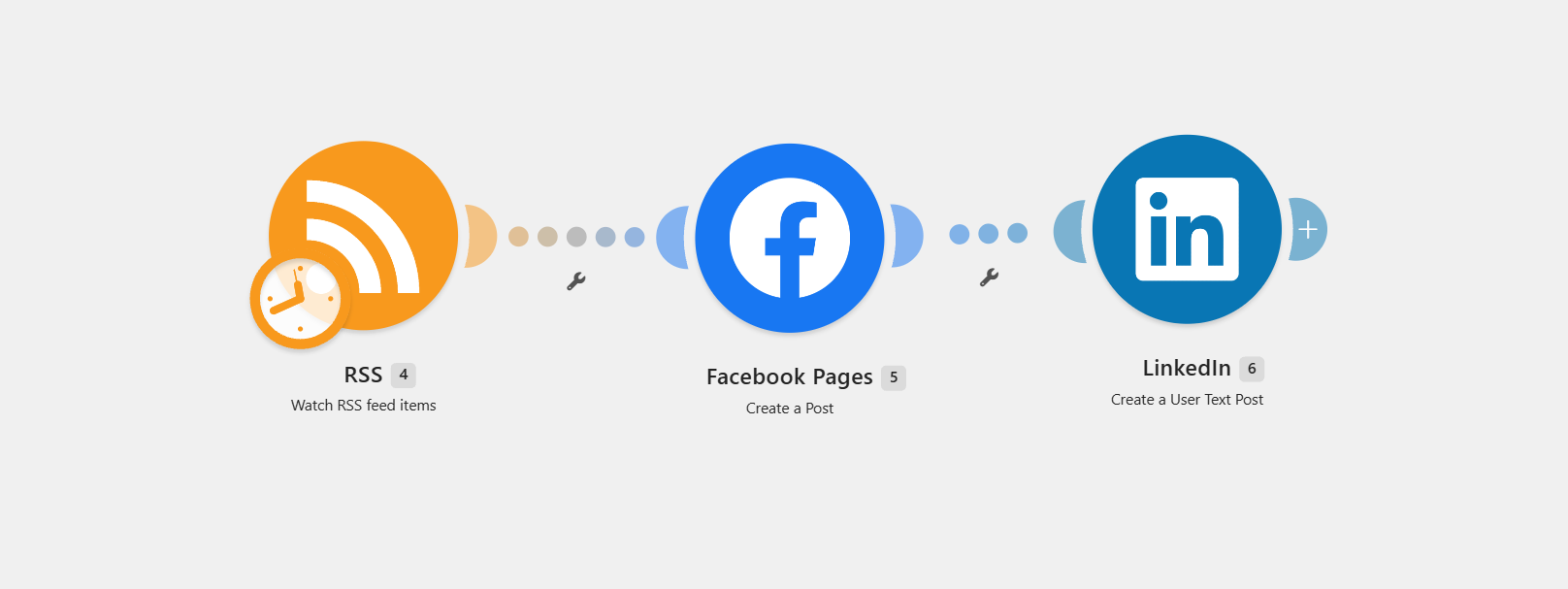
Make.com scenario with RSS Watch feed items, Facebook Pages Create a Post, and LinkedIn Create a User Text Post.

Workflow 1 end to end

RSS watch, summary, and both social posts in a single linear scenario with no manual handoff.

Scroll story: workflow 2

From industry news to your take. 

The second workflow is deliberately not hands-off. The automation finds and organizes the source material; you decide what is worth saying and what you think about it.

Vertical story view

Chapter 01

News is monitored

Automation

Source material collects itself.

What happens

The automation watches for relevant marketing and AI news arriving by email, so the reading list builds without anyone hunting for it.

Why it matters

Curation usually dies at collection. Watching an inbox turns a research task into a passive feed.

Behind the scenes

Gmail Watch emails -> new message bundle.

Data moving through this chapter

Incoming emailArticle linksSource nameReceived date
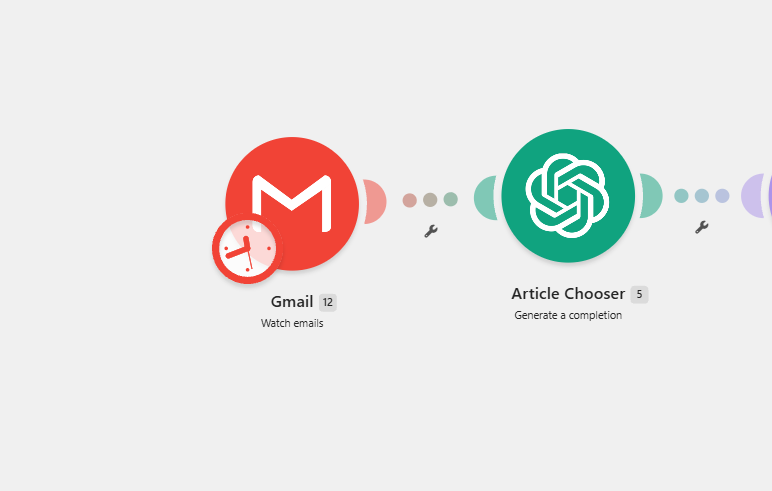
Zoomed view of the Make.com scenario showing Gmail Watch emails and an Article Chooser AI completion module.

News watch and selection

Gmail watches incoming news and an AI article chooser picks the relevant pieces.

Chapter 02

Articles are chosen

Automation

AI filters the noise down.

What happens

An AI article chooser reads the incoming material and identifies the pieces actually worth considering.

Why it matters

Most of what arrives is not postable. Filtering first keeps the review queue short enough that it gets reviewed.

Behind the scenes

Article Chooser completion -> selected articles.

Decision logic

Relevant to marketing or AI? It goes to the queue. Everything else is dropped.

Data moving through this chapter

Candidate listSelected articlesRelevanceReasoning
Zoomed view of the Make.com scenario showing Gmail Watch emails and an Article Chooser AI completion module.

News watch and selection

Gmail watches incoming news and an AI article chooser picks the relevant pieces.

Chapter 03

Everything lands in a sheet

Automation

The queue replaces the inbox.

What happens

The AI response is parsed into clean structured data and the rows are bulk-added to a Google Sheet.

Why it matters

A spreadsheet is a review surface. An inbox is a pile. The difference decides whether the workflow survives a busy week.

Behind the scenes

JSON Parse -> Google Sheets Bulk Add Rows.

Data moving through this chapter

Parsed JSONArticle rowsLink columnQueue
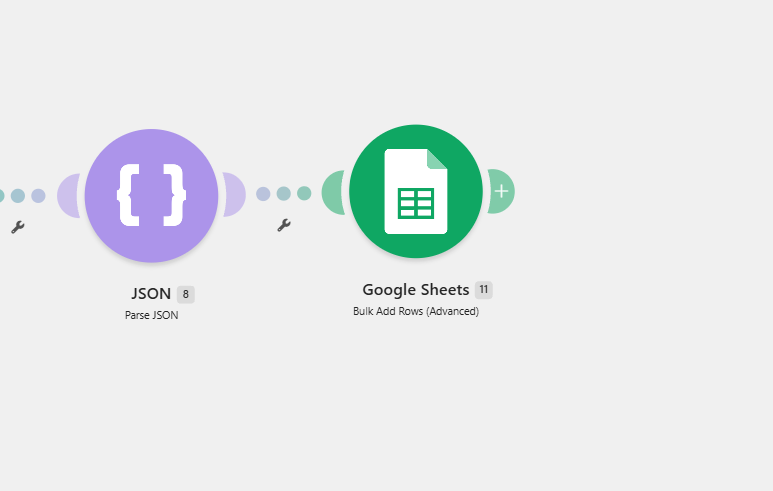
Zoomed view of the Make.com scenario showing JSON Parse and Google Sheets Bulk Add Rows modules.

Parsed into the review queue

The AI response is parsed as JSON and the articles are bulk-added as rows to a Google Sheet.

Chapter 04

You add your take

Human checkpoint

The human part stays human.

What happens

You pick the articles worth posting and write your own thoughts directly into the sheet next to them.

Why it matters

The perspective is the reason anyone reads the post. That is the one thing the system is deliberately not allowed to generate.

Behind the scenes

Manual edit of the thoughts column.

Data moving through this chapter

Your commentaryChosen articlesNotesRow state
Zoomed view of the Make.com scenario showing JSON Parse and Google Sheets Bulk Add Rows modules.

Parsed into the review queue

The AI response is parsed as JSON and the articles are bulk-added as rows to a Google Sheet.

Chapter 05

A checkbox approves it

Human checkpoint

Nothing posts without a tick.

What happens

Checking the approval box is the signal to publish, and a button press starts the posting run that reads the next approved row.

Why it matters

An explicit switch means the automation can never surprise you with a post you did not intend to send.

Behind the scenes

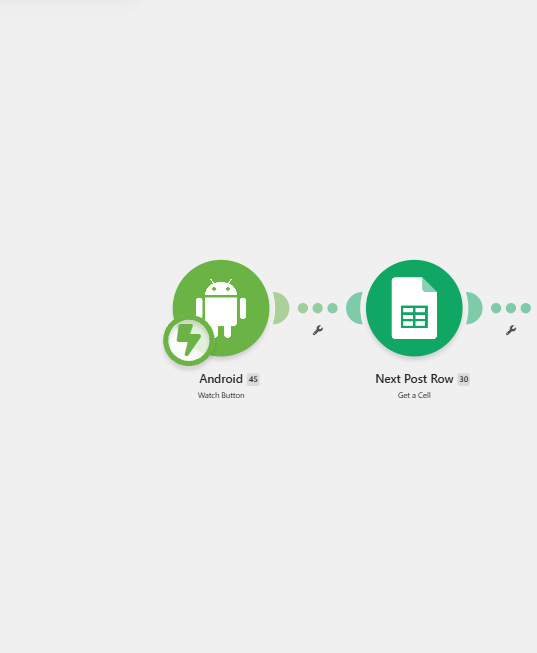
Watch Button -> Sheets Get a Cell -> Get Range Values.

Decision logic

Row approved? It publishes. Unapproved? It waits in the sheet indefinitely.

Data moving through this chapter

Approval flagNext rowRow valuesRun start
Zoomed view of the Make.com scenario showing the Watch Button trigger and Google Sheets Get a Cell and Get Range Values modules.

Approval read from the sheet

A button press starts the posting run and the next approved row is read out of the sheet.

Chapter 06

The approved post is built and logged

Automation

One post, two voices, one link.

What happens

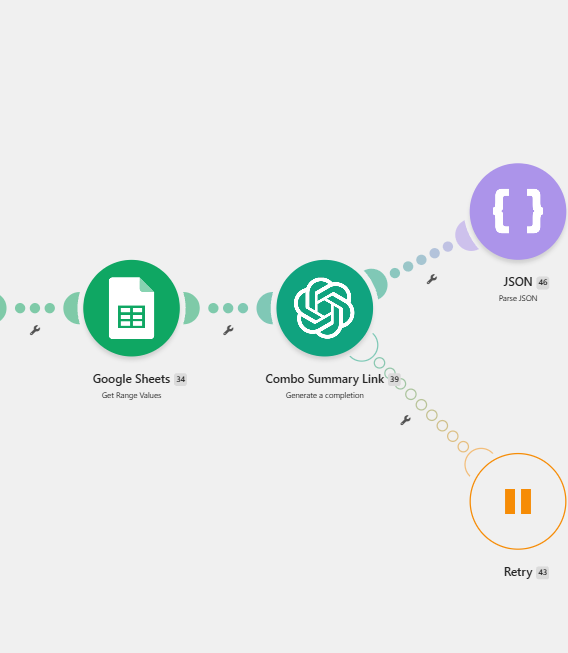
An AI step combines the article summary, your written thoughts, and the link. The result is parsed, posted to LinkedIn, and the row is marked as handled.

Why it matters

Marking the row closes the loop, so the same article never goes out twice and the queue always shows what is left.

Behind the scenes

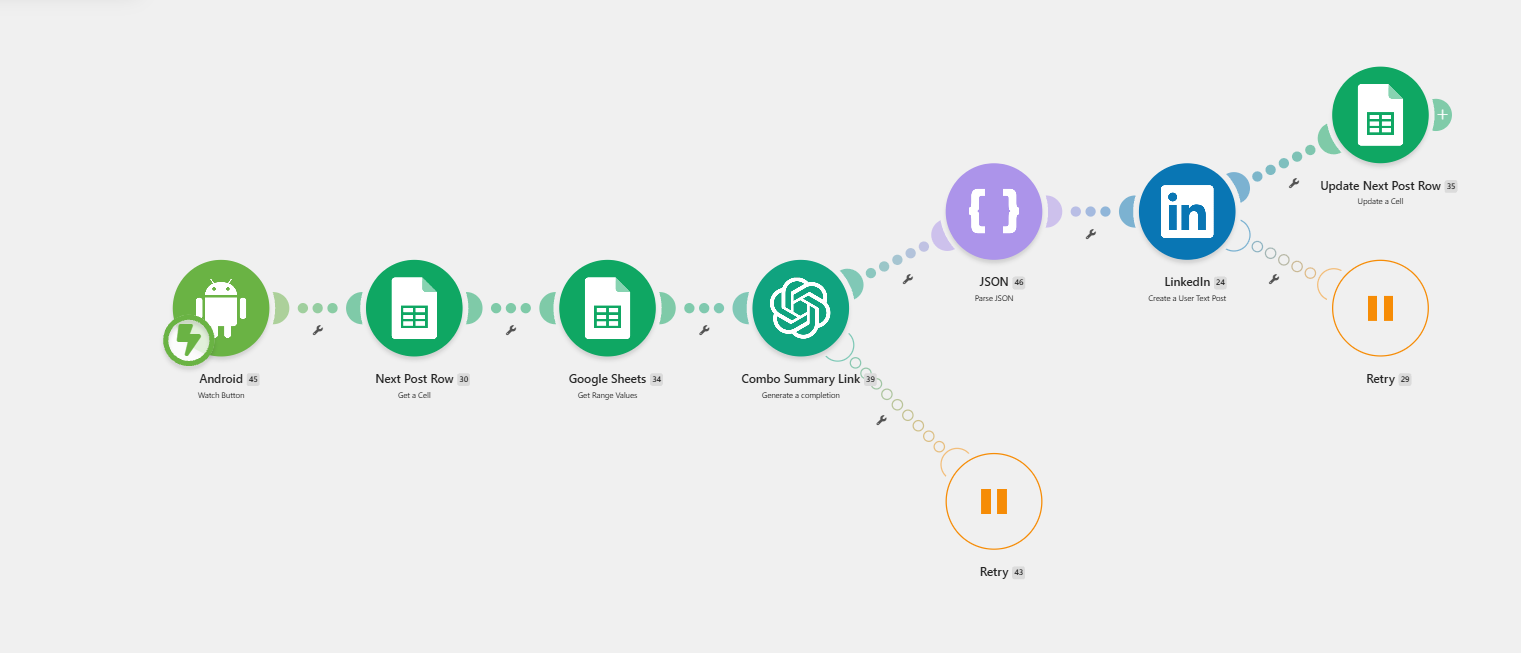
Combo Summary Link completion -> parse -> LinkedIn post -> Update Next Post Row.

Data moving through this chapter

Merged postYour takeArticle linkRow updated
Zoomed view of the Make.com scenario showing the Combo Summary Link AI completion and JSON parse modules.

Summary merged with your take

An AI step combines the article summary, your written thoughts, and the link, then the result is parsed.

Make.com scenario with Watch Button, Google Sheets reads, an AI combo summary, LinkedIn post, and a row update.

Workflow 2 end to end

Collection into the sheet and publication out of it: two halves joined by a human approval checkbox.

System logic

Not just if-this, then-that. 

The value is in the decisions between steps: which feed items are new, which articles are worth queueing, and what has to be true before anything is allowed to post.

Is this feed item new?

Yes

Summarize it and post to Facebook and LinkedIn.

No

Skip it, so the same article is never announced twice.

Is the article worth queueing?

Yes

Parse it into a row in the review sheet with its link.

No

Drop it before it reaches the queue you have to read.

Has the row been approved?

Yes

Merge the summary with your take, post it, and mark the row handled.

No

Leave it in the sheet until you decide, with nothing published.

Automated actions

  • Watch the blog feed
  • Write the social summary
  • Post to Facebook and LinkedIn
  • Collect industry news
  • Filter and parse the articles
  • Build the review queue
  • Publish approved posts and log them

Human actions

  • Publish the blog post
  • Review the queued articles
  • Choose what is worth sharing
  • Write your own take
  • Check the approval box
Business impact

Consistency without losing your voice. 

The system handles the parts that are repetitive and leaves the parts that require judgment. Your published articles get promoted, and industry news becomes a manageable queue of opportunities to comment on.

Owned content distribution

Every published article can be automatically turned into LinkedIn and Facebook posts, closing the gap between publishing and promoting.

Industry commentary

Curated marketing and AI news gives you something to say between your own articles, without spending the morning reading newsletters.

A reusable pattern

Both workflows have been adapted into company-specific versions, since the shape of the problem is the same across businesses.

Same day

Every post gets distributed

A published blog reaches both channels the day it goes live, instead of waiting for someone to remember it exists.

Zero

Copy-paste steps left

Summarizing, formatting, linking, cross-posting, and logging are handled by the system, so the effort goes into thinking rather than production.

Yours

The commentary stays human

The news workflow never posts on its own. It publishes articles you selected, alongside a take you wrote yourself.

The result

Distribution should not depend on remembering every channel.

Summarizing, formatting, linking, cross-posting, and logging move through one connected system. You choose the message and approve the post. The workflow handles the repetitive distribution work.