AUTOMATION CASE STUDY: THE BLOG FATHER

Blog writing, as a guided system. 

An automation that turns weekly keyword research into graded, editable blog drafts through DataForSEO, Gmail, AI assistants, and Google Docs.

The problem

Content work was too fragmented. 

The old process depended on repeated research, manual SEO checks, outlining, writing, revision, formatting, and publishing prep. The automation was designed to remove the repeatable work without removing the human decision points.

01

Find a topic

02

Check SEO data

03

Research competitors

04

Create outline

05

Write draft

06

Critique quality

07

Format document

08

Prepare publishing notes

Before

A person had to push every step forward.

New question

What if the system handled the repeatable research and drafting work automatically?

The solution

A content system, not a prompt. 

The prototype was built for Maxim, then adapted into different variations for multiple clients.

01

Make.com

Orchestrates scenarios, routers, filters, retries, and handoffs.

02

DataForSEO

Expands ideas into keyword options with search intent data.

03

Gmail

Delivers keyword batches and captures the selected topic by reply.

04

Human input

Selects the best opportunity and adds judgment / context.

05

AI assistants

Research, outline, write, critique, rewrite, personalize, and grade.

06

Google Docs

Receives the formatted draft, metadata, citations, and image notes.

Scroll story

Move through the automation. 

Each chapter advances the real workflow while the proof panel changes beside it: keyword discovery, reply trigger, research template, writing loops, final packaging, and human review.

Vertical story view

Chapter 01

Weekly keyword ideas are generated

Automation

Seed topics become curated keyword options.

What happens

The Weekly Keyword Ideas scenario starts with a seed list of keywords, asks DataForSEO for related question-style keyword ideas, parses the response, filters the options with AI, and emails the shortlist. Responding to the email with a chosen keyword begins the writing process.

Why it matters

The process starts with search-backed ideas instead of a blank page, while still keeping the final topic choice human-led.

Behind the scenes

Seeds -> Get Questions -> JSON -> Filter Questions -> Gmail.

Data moving through this chapter

Seed topicKeyword ideasJSON responseFiltered shortlist
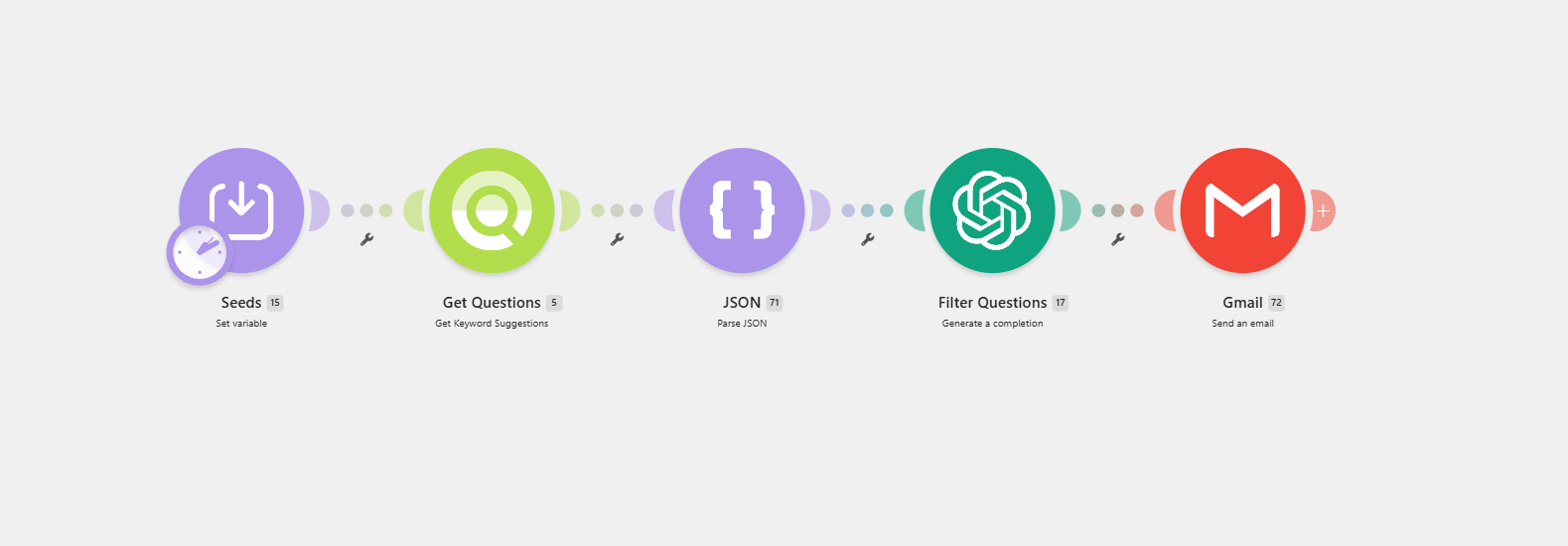
Make.com scenario showing Seeds, Get Questions, JSON, Filter Questions, and Gmail modules.

Weekly keyword ideas

Seeds -> DataForSEO question ideas -> JSON parse -> AI filter -> Gmail.

Chapter 02

The email reply starts the writer

Hybrid

A custom mailhook turns the reply into workflow data.

What happens

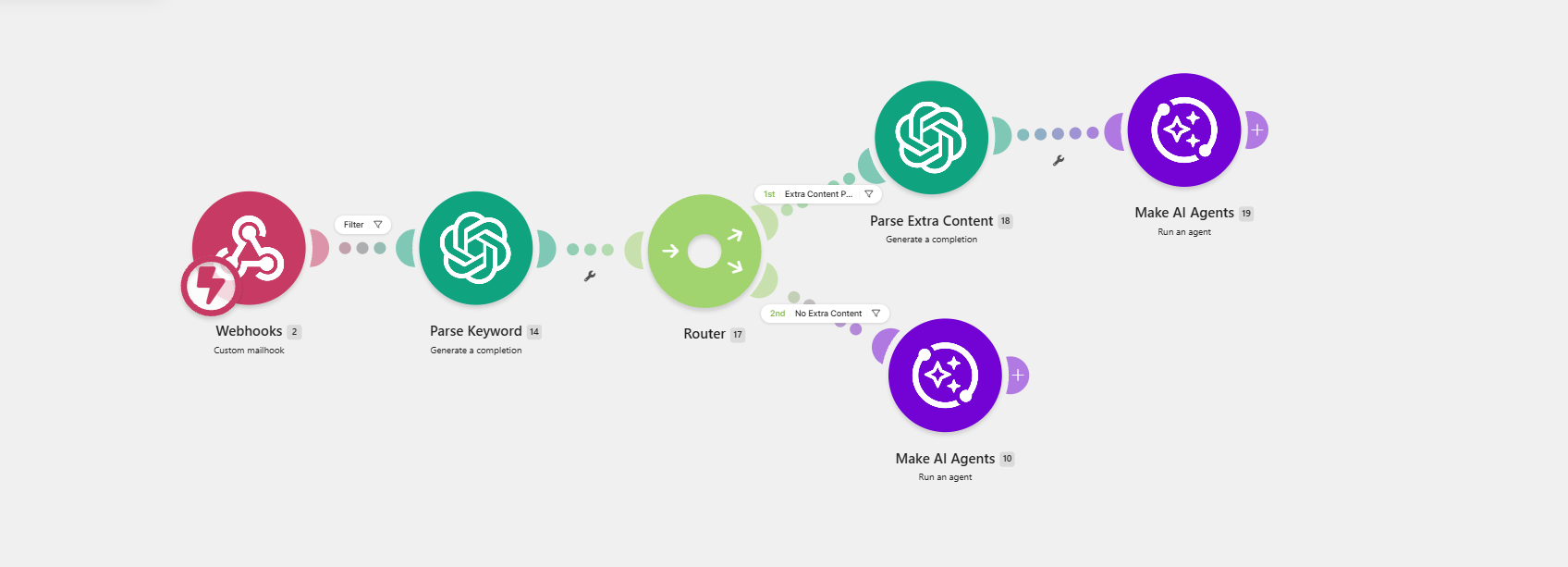
You reply to the keyword email with the chosen topic and optional additional context for the AI to use when researching and writing. The BlogFather Trigger scenario catches the reply, parses the keyword, and routes the run based on whether extra content was included.

Why it matters

The same reply keeps strategy in human hands while giving the automation structured inputs it can act on.

Behind the scenes

Webhooks -> Parse Keyword -> Router -> Parse Extra Content -> Make AI Agents.

Decision logic

Extra content provided? Parse and pass it into the agent. No extra content? Run the agent from the keyword alone.

Data moving through this chapter

Chosen keywordExtra contextRoute selectionAgent input
Make.com BlogFather Trigger scenario with webhook, parse keyword, router, parse extra content, and Make AI Agents routes.

Reply trigger and routing

Custom mailhook -> keyword parser -> router -> extra-content parser or direct AI agent run.

Chapter 03

The research template is built

Automation

Ranking content becomes the article plan.

What happens

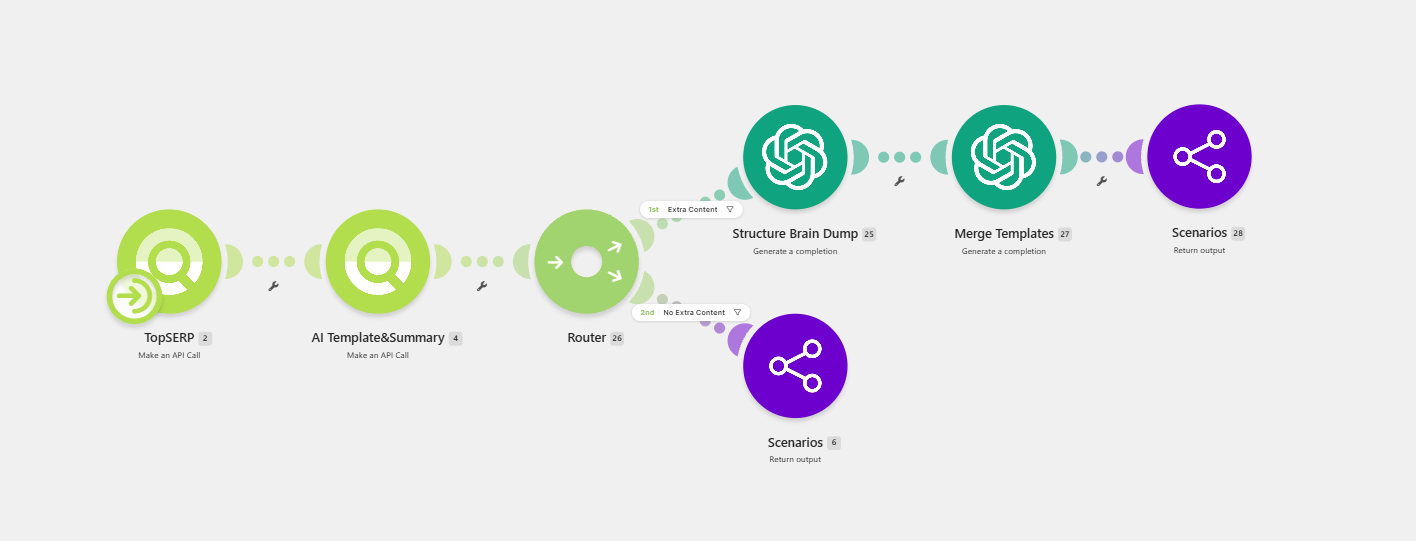
The Write Template scenario checks what already ranks, summarizes the search results, and either merges the research with your extra context or returns the research-based template.

Why it matters

The article starts from proven search demand instead of a generic outline, but it can still include the specific angle you want.

Behind the scenes

TopSERP -> AI Template&Summary -> Router -> Structure Brain Dump -> Merge Templates -> Return output.

Decision logic

Extra context included? Merge it with the SERP-based template before writing.

Data moving through this chapter

SERP resultsSource summariesBrain dumpMerged template
Make.com Write Template scenario with TopSERP, AI Template and Summary, router, Structure Brain Dump, Merge Templates, and return output modules.

Template builder

TopSERP research -> template summary -> extra-content router -> merge templates or return output.

Chapter 04

The body is drafted and tested

Automation

The largest section gets the strictest loop.

What happens

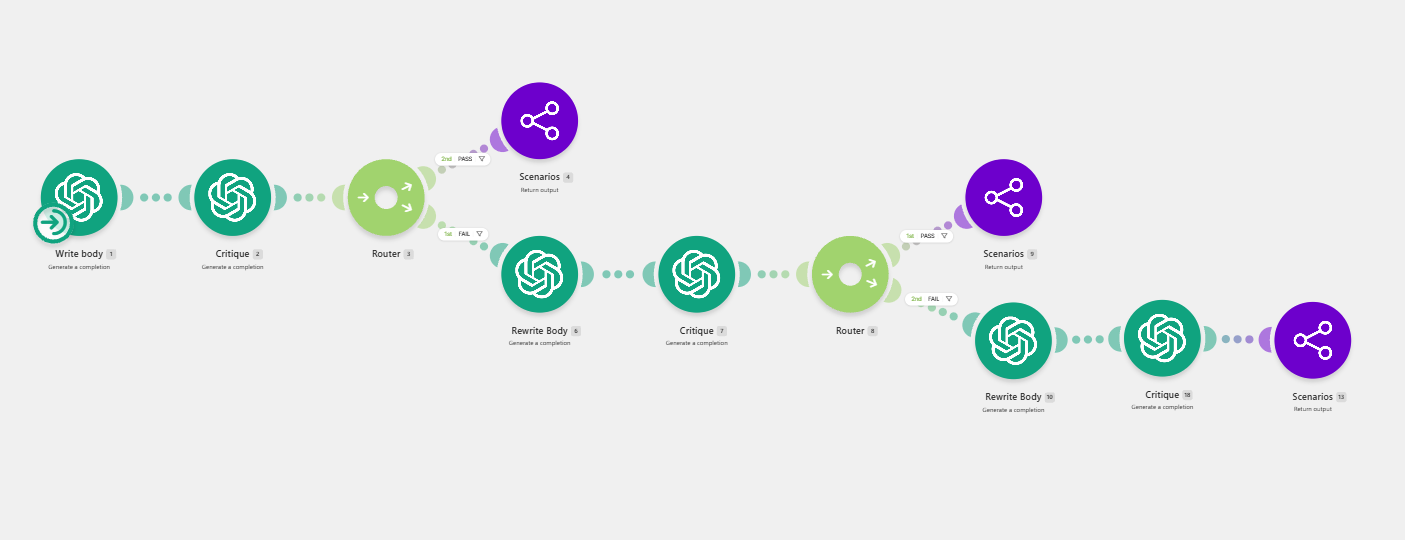
The Write Body scenario drafts the article body, critiques it, and routes failed drafts into rewrite attempts before returning the output.

Why it matters

Most of the article's value lives in the body. The automation does not trust the first pass by default.

Behind the scenes

Write body -> Critique -> Router -> Rewrite Body -> Critique -> Return output.

Decision logic

Pass? Return the body. Fail? Rewrite and critique again.

Data moving through this chapter

Body draftCritique notesPass/fail routeRewrite attempt
Make.com Write Body scenario showing write, critique, router, rewrite body, additional critique, and return output branches.

Body draft loop

Write body -> critique -> pass/fail router -> up to two rewrite passes.

Chapter 05

The intro is written with context

Automation

The opening is created after the body exists.

What happens

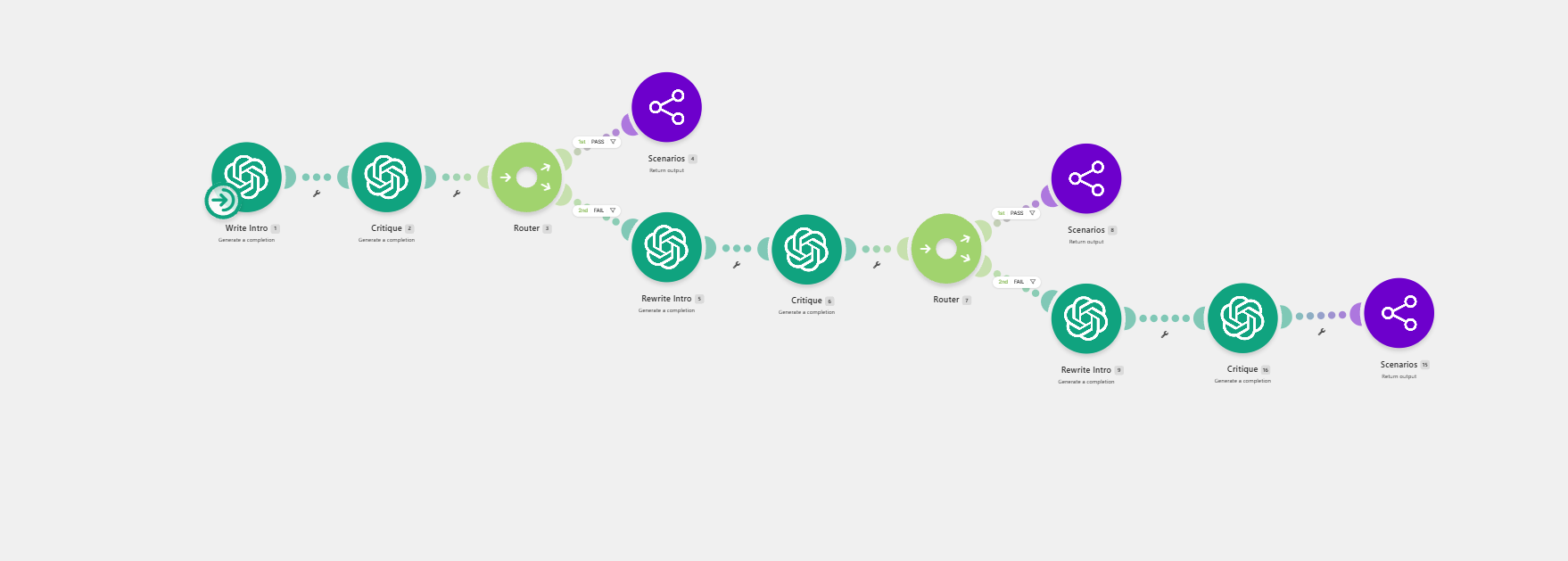
The Write Intro scenario uses the same quality-gate structure, but it runs after the body so the opening can frame the real article.

Why it matters

The intro works better when it is written with context from the body instead of being guessed up front.

Behind the scenes

Write Intro -> Critique -> Router -> Rewrite Intro -> Critique -> Return output.

Data moving through this chapter

Intro draftBody contextCritique resultRewrite attempt
Make.com Write Intro scenario with write intro, critique, routers, rewrite intro attempts, and return output modules.

Intro draft loop

Intro writing uses the same critique-and-rewrite structure as the body.

Chapter 06

The closing is written last

Automation

The conclusion gets the full article context.

What happens

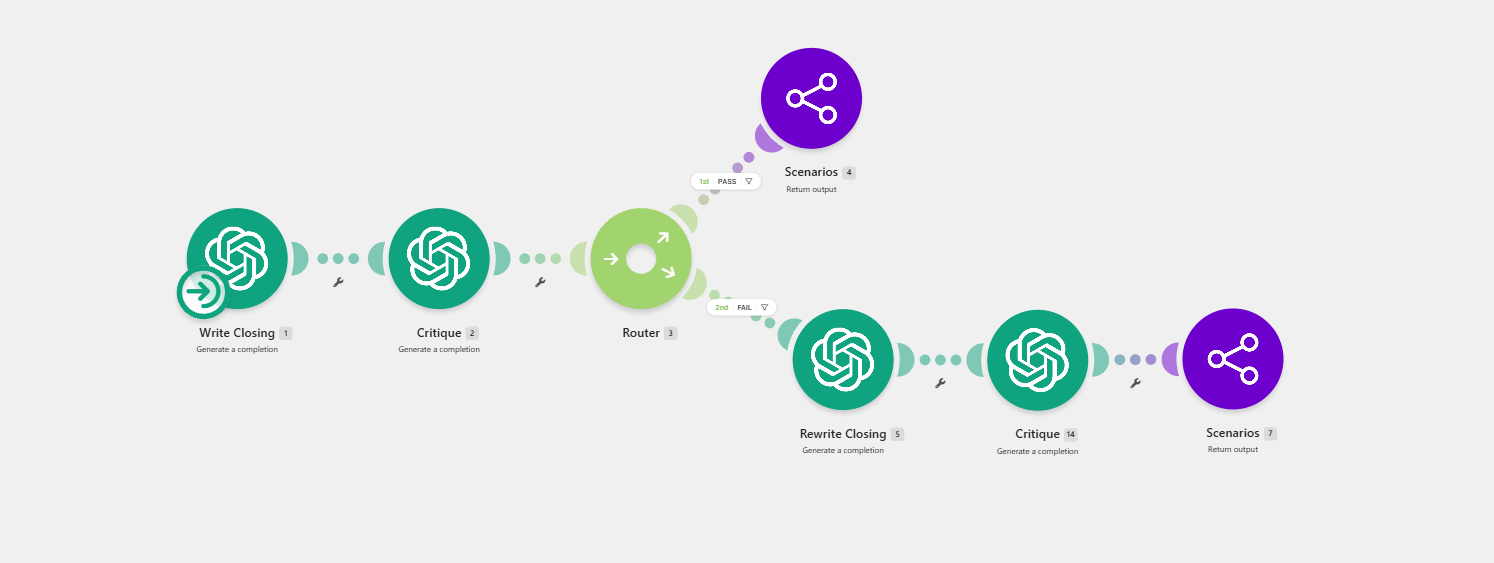
The Write Closing scenario writes the conclusion, critiques it, and rewrites when the closing does not pass.

Why it matters

The conclusion can summarize the article more accurately when it has the complete draft in view.

Behind the scenes

Write Closing -> Critique -> Router -> Rewrite Closing -> Critique -> Return output.

Data moving through this chapter

Closing draftFull article contextCritique resultReturn output
Make.com Write Closing scenario with write closing, critique, router, rewrite closing, and return output modules.

Closing draft loop

Closing copy is checked, rewritten when needed, and returned only after the quality gate.

Chapter 07

Final tasks package the draft

Automation

The article becomes an editor-ready document.

What happens

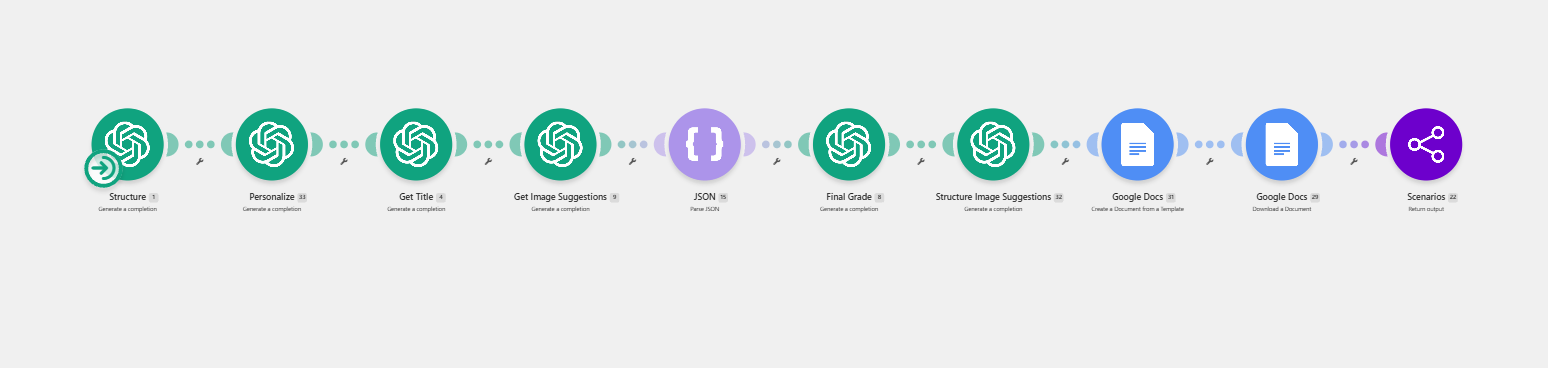
The Final Tasks scenario structures the article, personalizes the voice, creates the title and image suggestions, parses the image data, provides SEO data/meta descriptions, grades the final result, and creates the structured Google Doc.

Why it matters

The output is a usable draft package with metadata and editor review notes with suggested changes rather than a raw block of AI text.

Behind the scenes

Structure -> Personalize -> Get Title -> Get Image Suggestions -> SEO Data -> JSON -> Final Grade -> Google Docs.

Data moving through this chapter

SEO titleMeta descriptionImage suggestionsAlt textFinal grade
Make.com Final Tasks scenario with structure, personalize, get title, get image suggestions, JSON parse, final grade, Google Docs, and return output modules.

Final tasks

Structure -> personalize -> title -> image ideas -> JSON -> final grade -> Google Docs.

Chapter 08

Editor reviews before publish

Hybrid

FINAL HUMAN CHECK.

What happens

The finished draft lands in Google Drive. Publishing remains manual, with a separate social post automation available after the blog goes live.

Why it matters

The system saves hours, but final judgment stays where it belongs: with a person ultimately responsible for final content.

Behind the scenes

Google Doc -> editor review -> website publish -> optional social media automation.

Data moving through this chapter

Google DocEditor notesPublished URLSocial post trigger
System logic

Not just if-this, then-that. 

The value is in the decisions between steps: what data is present, whether a draft passes quality gates, and when a human should review the result.

Was extra context included?

Yes

Merge the human angle with ranking-source research.

No

Build the template from search research alone.

Did the section pass critique?

Yes

Send it to the next writing stage.

No

Rewrite, critique again, and cap retries at three attempts.

Is the final article ready to publish?

Yes

Create the Google Doc with title, meta description, citations, and image notes.

No

Keep the editor in the loop before publishing.

Automated actions

  • Keyword expansion
  • SERP research
  • Template generation
  • Drafting and rewrites
  • Final grading
  • Google Doc creation

Human actions

  • Choose the strongest keyword
  • Add service, brand, or article context
  • Review & edit the final draft
  • Confirm the content fits the business
  • Publish inside the website builder
Business impact

Saved hours of research and writing. 

The system turned a fragmented content workflow into a repeatable process that was built first for Maxim and then adapted across multiple client implementations.

Sample output

Google Doc draft

PASSED 96/100

TITLE

Exploring the Benefits of Automation in Business: How It Transforms Operations

Includes

H tags, keyword list, meta description, image ideas, alt text, citations, and editor notes.

Review status

Ready for human review before manual website publishing.

Hours

Saved per article cycle

Research, outlining, drafting, and formatting moved from manual effort into a guided workflow.

Multi-client

Adapted beyond the prototype

The Maxim prototype became a repeatable automation pattern with client-specific variations.

Human-led

Automation with judgment preserved

People still choose the angle and review the draft. The system handles the repetitive execution.

The result

A repeatable content workflow with judgment built in.

Research, drafting, critique, formatting, and publishing prep now move through one connected workflow. Humans choose the strategy. The system handles the heavy lift.